Your AI Agents Are Burning Their Budget Before the First Message: 4 Advanced Patterns to Fix That

A few weeks ago, I attended the TechByte "Building with Advanced Agent Capabilities" webinar organized by Google Cloud (Ivan Nardini, Alex Notov). Around the same time, Anthropic quietly published four cookbooks addressing problems that everyone encounters in production but few document with actual numbers.
What follows is not a documentation summary. It's a synthesis of patterns I'm actively applying or evaluating in production AI transformation contexts — real cases with Jira/Confluence agents, multiple MCP servers, and constraints that leave no room for error.
The Problem Nobody Admits
When you build your first agent with a handful of tools, everything feels smooth. Then comes the day you connect multiple MCP servers to your system, and you discover something unpleasant: your agent consumes tens of thousands of tokens before receiving the first user question.
Here are the numbers published by Anthropic in the Google Cloud webinar context:
| MCP Server | Tools | Tokens Consumed |
|---|---|---|
| GitHub MCP | 35 tools | ~26,000 tokens |
| Slack MCP | 11 tools | ~21,000 tokens |
| Sentry MCP | 5 tools | ~3,000 tokens |
| Grafana MCP | 5 tools | ~3,000 tokens |
| Splunk MCP | 2 tools | ~2,000 tokens |
| Total | 58 tools | ~55,000 tokens |
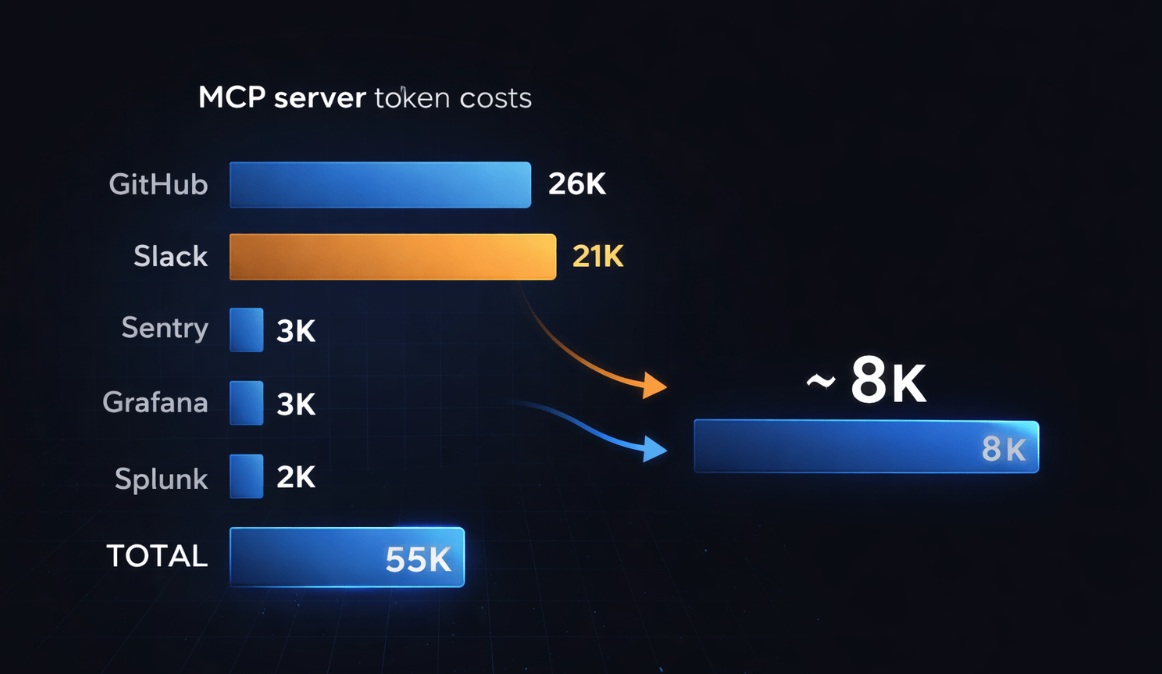
...before the conversation even starts. At scale, we're easily talking about 100,000+ tokens of systematic overhead. The problem is twofold: direct token cost, and degradation of tool selection accuracy when context is saturated.
The good news: Anthropic published four concrete solutions. Here's how they work, with the real benchmarks.
Pattern 1 — Tool Search with Embeddings: Discovering Tools On Demand
The Principle
Instead of loading all tool definitions upfront, you give the agent a single meta-tool: tool_search. When Claude needs a capability, it searches for it semantically. The matching definitions are loaded into context only at that moment.
The Anthropic cookbook (Tool search with embeddings) implements this using sentence-transformers/all-MiniLM-L6-v2 — a lightweight model (384 dimensions) that runs locally, without additional API calls.
Architecture
# 1. At startup: embed all available tools
tool_texts = [tool_to_text(tool) for tool in TOOL_LIBRARY]
tool_embeddings = embedding_model.encode(tool_texts, convert_to_numpy=True)

# 2. When the agent calls tool_search
def search_tools(query: str, top_k: int = 5):
    query_embedding = embedding_model.encode(query, convert_to_numpy=True)
    # Cosine similarity via dot product (normalized embeddings)
    similarities = np.dot(tool_embeddings, query_embedding)
    top_indices = np.argsort(similarities)[-top_k:][::-1]
    return [TOOL_LIBRARY[idx] for idx in top_indices]
The tool_search result returns tool_reference objects — not full definitions — which allows Claude to immediately use the discovered tools.
Measured Results
- Initial context reduction: 90%+ (from N full definitions to just 1)
- Scales to thousands of tools without architectural changes
- Selection accuracy improves because the model works with less noise
When to use it: as soon as you have more than 10-20 tools, or when connecting multiple MCP servers.
Pattern 2 — Tool Search Tool with defer_loading: The Native Anthropic Solution
What the Webinar Reveals
In the Google Cloud presentation, Anthropic introduced an even more direct solution: the defer_loading: true parameter in tool definitions. This is the "official" version of the previous pattern, integrated directly into the API.
How it works:
- You mark your tools with
defer_loading: true - Claude initially only sees the
Tool Search Tool - When Claude needs a capability, it searches — matching tools are loaded on demand
- Result: only relevant tools enter the context
Published Numbers
| Model | Without Tool Search Tool | With Tool Search Tool |
|---|---|---|
| Opus 4 | 49% accuracy | 74% accuracy |
| Opus 4.5 | 79.5% accuracy | 88.1% accuracy |
Token reduction: 85% while maintaining full tool access.
Recommended thresholds for enabling this pattern:
- Tool definitions consuming >10,000 tokens
- Tool selection accuracy issues
- MCP-powered systems with multiple servers
- 10+ tools available
This is exactly the typical situation with enterprise Jira/Confluence agents. A single Atlassian MCP server can expose dozens of endpoints.
Pattern 3 — Automatic Context Compaction: Long-Running Workflows
The Concrete Problem
Imagine a support agent processing 30 tickets sequentially. Each ticket requires 7 tool calls (classification, KB search, prioritization, routing, drafting, validation, closure). Without context management, by ticket 10, the agent drags the complete history of the previous 9 tickets into every request.
The Automatic Context Compaction cookbook measures this precisely across 5 tickets:
| Metric | Without Compaction | With Compaction |
|---|---|---|
| Input tokens | 204,416 | 82,171 |
| Output tokens | 4,422 | 4,275 |
| Total | 208,838 | 86,446 |
| Compactions triggered | — | 2 |
| Savings | — | 58.6% |
And work quality remains identical: all tickets are processed correctly.
The Implementation
runner = client.beta.messages.tool_runner(
    model="claude-sonnet-4-5",
    max_tokens=4096,
    tools=tools,
    messages=messages,
    compaction_control={
        "enabled": True,
        "context_token_threshold": 5000,   # Trigger threshold
        "model": "claude-haiku-4-5",        # Cheaper model for summaries
        "summary_prompt": """..."""          # Optional custom prompt
    },
)
What Happens During Compaction
- The SDK detects the threshold has been exceeded
- It injects a summary prompt as a user message
- Claude generates a structured summary (between
<summary></summary>tags) - The complete history is replaced by this single summary
- The workflow continues with clean context
What's retained: processed ticket IDs, categories, priorities, routing teams, progress status.
What's discarded: complete KB articles, full drafted response text, detailed tool call chains.
Threshold Calibration
| Threshold | Recommended Use |
|---|---|
| 5,000 – 20,000 tokens | Sequential processing of independent entities (tickets, leads, documents) |
| 50,000 – 100,000 tokens | Multi-phase workflows with few natural breakpoints |
| 100,000 – 150,000 tokens | Tasks requiring extended historical context |
| 100,000 (default) | Good balance for generic long-running workflows |
Ideal use cases: document batch processing, sequential data analysis, code review pipelines, multi-ticket support agents.
Avoid for: very short tasks (<50k tokens total), required complete audit trails, iterative refinement workflows where each step depends on exact details from all previous steps.
Pattern 4 — Programmatic Tool Calling (PTC): Reducing Latency in Complex Workflows
The Core Problem
In a classic workflow, each tool call generates a complete round-trip: the model decides, the tool executes, the result is sent back to the model, the model decides again. For pipelines requiring 10-20 sequential calls with large results, this quickly becomes prohibitive.
The Programmatic Tool Calling cookbook demonstrates an alternative: letting Claude write Python code that calls tools directly in the execution environment, without a round-trip for each invocation.
Real Benchmark: Travel Expense Analysis
Test case: identify engineering team members who exceeded their quarterly travel budget, with custom budget verification.
| Metric | Classic Tool Calling | With PTC |
|---|---|---|
| API calls | 4 | Significantly fewer |
| Tokens consumed | 110,473 | Reduced |
| Total latency | 35.38 seconds | Improved |
Without PTC, the model receives the raw get_expenses() results in full — potentially hundreds of rows per employee, with complete metadata (receipt URLs, approval chains, project codes). With PTC, Claude writes code that filters, aggregates, and surfaces only what it needs before that data enters the context window.
# Conceptual example of what PTC generates
import json

# Claude writes this code that runs locally
expenses = json.loads(get_expenses("ENG001", "Q3"))
travel_total = sum(
    e["amount"] for e in expenses
    if e["category"] == "travel" and e["status"] == "approved"
)
# Only the aggregated value returns to the model — not the 100+ raw rows
When to use PTC:
- Third-party tools you can't modify returning large results
- Sequential dependencies between tool calls
- Filtering/aggregation needed before model analysis
- High-frequency pipelines where latency matters
Pattern 5 — Agent Memory: Cross-Session Persistence
What Most Agents Forget
An agent without persistent memory is an agent that starts from scratch every conversation. For business use cases — project tracking, user onboarding, longitudinal analysis — that's a deal-breaker.
The Memory & Context Management cookbook introduces a file-based memory system, illustrated by the "Claude Plays Pokémon" example: the agent maintains precise notes across thousands of game steps, developing strategies over time without this being explicitly programmed.
Demonstrated capabilities:
- Project state maintenance across sessions
- Reference to previous work without full context
- Objective tracking over thousands of steps
- Progressive strategic note-building
Simplified Architecture
# Memory tools available to the agent
@beta_tool
def read_memory(key: str) -> dict:
    """Read a persistent memory entry."""
    memory_file = Path(f"memory/{key}.json")
    return json.loads(memory_file.read_text()) if memory_file.exists() else {}

@beta_tool
def write_memory(key: str, data: dict) -> bool:
    """Persist information across sessions."""
    Path("memory").mkdir(exist_ok=True)
    Path(f"memory/{key}.json").write_text(json.dumps(data, indent=2))
    return True
The agent decides itself what to remember, when to consult memory, and how to structure information. This autonomy is what distinguishes this pattern from a simple database.
Overview: When to Apply Which Pattern
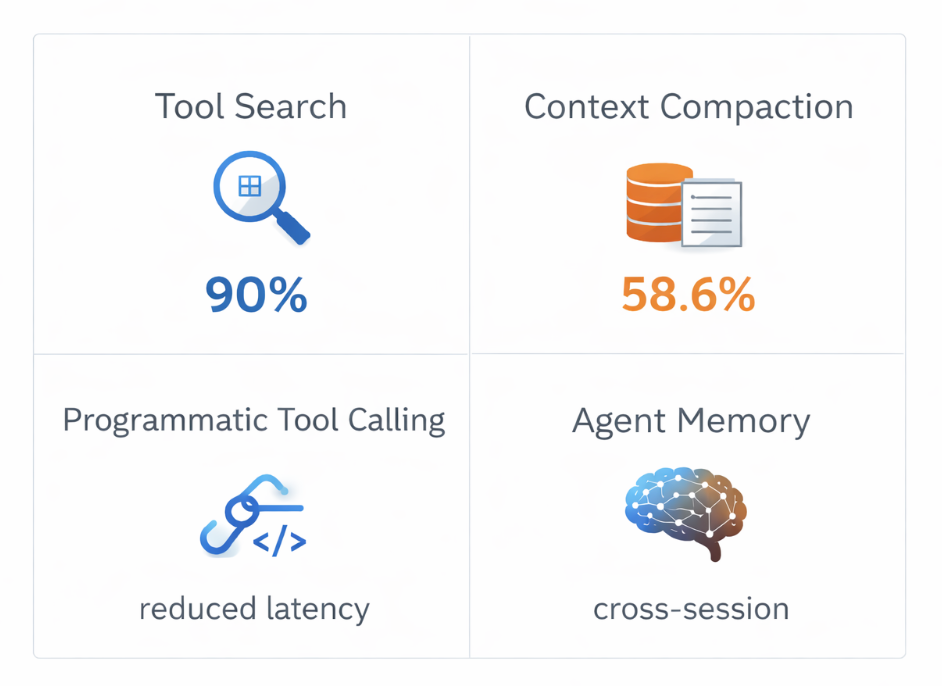
| Situation | Recommended Pattern |
|---|---|
| >10 MCP tools, high context cost | Tool Search with Embeddings + defer_loading |
| Workflows >50k tokens, repetitive tasks | Automatic Context Compaction |
| Large tool results, sequential dependencies | Programmatic Tool Calling |
| Agents needing cross-session continuity | Agent Memory (file-based) |
| Combination of multiple problems | Multi-pattern: compaction + tool search |
In a Jira/Confluence integration project via MCP, a Tool Search + Compaction combination is a natural fit. An agent exposing 40+ Atlassian operations cannot afford to load all definitions on every conversation.
What This Changes for Architects and CTOs
These four patterns aren't cosmetic optimizations. They represent a philosophical shift in agent design:
Before: load all context at startup, hope the model finds its way.
After: dynamic context, on-demand discovery, intelligent compression. The agent consumes only what it needs, when it needs it.
For CTOs and CAIOs, the concrete implications:
Cost reduction: 58 to 90% depending on the pattern. For high-frequency production agents, this changes the project economics entirely.
Improved reliability: a model working with clean context makes fewer tool selection errors. Anthropic benchmarks show +25% accuracy for Opus 4 with Tool Search Tool.
Real scalability: the Tool Search pattern enables scaling from 10 tools to 10,000 without architectural refactoring. That's the difference between a prototype and an enterprise system.
Long-running workflows: automatic compaction is what makes batch processing agents possible — workflows that run for hours, not minutes.
Going Further
The four Anthropic cookbooks with complete code:
- Automatic Context Compaction — Pedram Navid, Nov. 2025
- Tool Search with Embeddings — Henry Keetay, Nov. 2025
- Programmatic Tool Calling (PTC) — Pedram Navid, Nov. 2025
- Memory & Context Management — Alex Notov, May 2025
Full webinar: TechByte: Building with Advanced Agent Capabilities — Ivan Nardini & Alex Notov, Google Cloud / Anthropic, February 2026.
These patterns apply directly to ADK architectures and any MCP integration in production. If you're working on this type of architecture in an enterprise context, I'm available to discuss the concrete implications.
Tags: #AIAgents #MCP #ContextManagement #Architecture #Anthropic #Claude #LLM #ToolUse #EnterpriseAI



Comments ()